
What is URLwo? The Complete Guide to Smart Link Management
 Antonio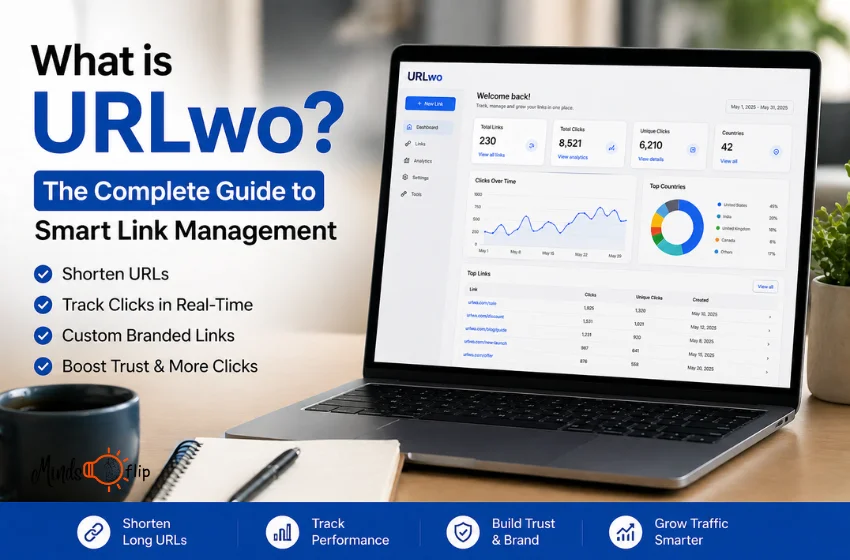
Have you ever copied a link to share with someone and it looked like this:
Yeah. Not great.
Nobody wants to click that. Nobody wants to copy that. And honestly, it makes your brand look a little unprofessional too.
The good news? There is a simple fix for this and thousands of marketers, bloggers, and business owners in the USA are already using it.
In this guide, you will learn everything about URLwo. What it is, how it works, what features it has, and whether it is actually worth using. No complicated words. No fluff. Just straight answers that help you decide if this tool is right for you.
Let's get into it.
What is URLwo?
Long links are a mess. They look bad, they break in emails, and people don't trust them enough to click.
URLwo solves this. It is a link management tool that turns long, ugly URLs into short, clean, and trackable links. You create the link, customize it to match your brand, and share it anywhere.
The best part? You can see exactly who clicked it, where they came from, and when. All in one place.
No tech skills needed. No complicated setup. Just cleaner links that actually work for you.
What Does It Actually Do?
Most people think it is just a link shortener. It is much more than that.
You can shorten any long URL into something clean and easy to share in seconds. You can also add your brand name to the link so it looks professional and trustworthy. Instead of a random string of letters, your link actually makes sense to the person clicking it.
But the real power is in the tracking. You can see how many people clicked your link, where they came from, and exactly when they clicked. This tells you what is working and what is not, so you can make smarter decisions.
On top of that, you can organize all your links in one dashboard instead of losing them across different tools and spreadsheets. You can even add password protection or set an expiry date on a link if you only want certain people to access it for a limited time.
It is basically a control center for every link you share online.
Who is It For?
URLwo is not just for big companies or tech people. Anyone who shares links online can use it.
If you run a small business, it helps you share clean, branded links with your customers instead of long messy ones. If you are a blogger or content creator, you can track which links your audience actually clicks so you know what content they care about. If you work in marketing, the analytics alone will save you hours of guesswork every week.
Even if you are just starting out and have no technical experience, the platform is simple enough to figure out in a few minutes. You do not need to know coding or anything complicated.
Basically, if you share links online and you want them to look better, perform better, and give you real data this tool was made for you.
Key Features You Should Know About
The features are straightforward but genuinely useful.
The first thing most people notice is the URL shortener. You paste your long link, and it gives you something short and clean within seconds. No waiting, no complicated steps.
Then there is the customization option. Instead of a random mix of letters, you can put your own brand name or campaign name in the link. This builds trust because people can see where the link is going before they even click it.
The analytics dashboard is where things get really interesting. It shows you exactly how your links are performing in real time. You can see total clicks, the location of your audience, and which platform is sending the most traffic. This is incredibly useful when you are running a campaign and need to know what is actually working.
For teams, there is a shared workspace where everyone can access and manage links together. No more sending links back and forth over email. Everything stays in one place and everyone stays on the same page.
Security is also covered. You can put a password on any link or set it to expire after a certain date. This is helpful when sharing something that should not stay public forever.
Altogether, the features are not overwhelming. They are practical and built around real problems people face every day.
How It Helps You Get More Clicks
The link you share says a lot about you before anyone even clicks it.
A long, messy URL looks suspicious. People see it and think twice. But a short, clean, branded link looks professional and trustworthy. That one small change can make a big difference in how many people actually click.
When your link clearly shows your brand name, people feel safer. They know where they are going. That confidence turns into more clicks, more traffic, and more conversions for your business.
The tracking data also plays a big role here. When you can see which links are getting clicks and which ones are not, you stop guessing and start making real decisions. You test different links, see what your audience responds to, and improve over time. This is how smart marketers grow their results without spending more money.
On top of that, clean short links perform better on social media. Platforms like Twitter, Instagram, and LinkedIn all look cleaner when your link is short and neat. It does not take up space, it does not look spammy, and it fits naturally into your content.
Small details like this add up. And that is exactly where most people are quietly losing clicks without even realizing it.
How It Compares to Other Link Shorteners
There are other tools out there. Bitly is the most well known. TinyURL has been around for years. So what makes this one different?
The biggest difference is the combination of features you get in one place. Most basic shorteners just shorten your link and that is it. You get a short URL but no branding, no detailed analytics, and no team tools. You have to piece everything together using multiple platforms.
Bitly does offer some of these features but the free plan is very limited. Once you need more clicks or more links, you are pushed toward a paid plan pretty quickly. For small businesses and creators who are just starting out, that becomes a problem fast.
URLwo focuses on giving you customization, tracking, and organization without making things complicated or expensive. The dashboard is cleaner and easier to understand, especially if you are not a tech person.
The other thing worth mentioning is trust. A branded short link that includes your name looks far more professional than a generic bitly or tinyurl link. When someone sees your brand in the URL itself, it feels intentional. It feels like you care about the details.
That is the real difference. It is not just about shortening links. It is about making every link you share work harder for you.
See Also : Messagenal A Simple Guide to Smarter Communication in 2026
How to Get Started Step by Step
Getting started is easier than you think. The whole setup takes less than five minutes. Here is exactly what to do:
- Go to the URLwo website and create a free account using just your email address. No credit card needed.
- Paste your long URL into the link creation box on the dashboard and hit shorten.
- Customize your link by adding your brand name or a keyword so it looks clean and professional.
- Share your link anywhere on social media, emails, ads, or your website.
- Check your dashboard regularly to see who clicked, where they came from, and what is performing best.
- Improve over time by testing different links and using the data to make smarter decisions.
That is it. No complicated setup. No technical knowledge needed. You are ready to go in minutes.
Is It Free or Paid?
Yes, URLwo has a free plan. You can sign up, shorten links, and check basic analytics without spending a single dollar.
When you need more advanced analytics, higher limits, or team access there are paid plans available. But for most beginners, the free version is more than enough to get started.
Try it for free first. Upgrade only when your needs gro
Is It Worth Using? Our Honest Take
If you share links casually once or twice a month, any free shortener will do. You do not need anything fancy.
But if you are building a brand, running campaigns, or trying to grow online this tool makes a real difference. Clean branded links, click tracking, and everything in one place saves time and helps you make smarter decisions.
It is easy to learn and quick to set up. The only thing that matters is that you actually use the data it gives you. That is where the real value is.
Short answer: yes, it is worth it.
Final Thoughts
If you share links online and you want them to look better, perform better, and actually give you useful data, a URL is a smart choice.
It is simple to use, free to start, and built for real people not just tech experts. Whether you are a blogger, marketer, or small business owner, it gives you everything you need to manage your links properly in one place.
Stop sharing messy links. Start sharing ones that work for you.
Looking for more helpful guides on digital tools, marketing, and growing your online presence? Visit Mindslfip and explore everything we have for you.